মাত্র ৫ মিনিটে তৈরি করুন প্রিমিয়াম ই-কমার্স ওয়েবসাইট! সম্পূর্ণ Master Prompt ও তৈরির নিয়ম
আপনি কি নিজের একটি অনলাইন শপ তৈরি করতে চান? কিন্তু ওয়েবসাইট ডিজাইন, কোডিং কিংবা WordPress সম্পর্কে তেমন কোনো ধারণা নেই?
তাহলে আজকের এই আর্টিকেলটি আপনার জন্য।
বর্তমানে AI-এর সাহায্যে খুব সহজেই একটি প্রফেশনাল ই-কমার্স ওয়েবসাইট তৈরি করা সম্ভব। এমনকি আপনি চাইলে ChatGPT বা অন্য কোনো AI Coding Assistant ব্যবহার করে নিজের পছন্দমতো WordPress Theme তৈরি করতে পারবেন।
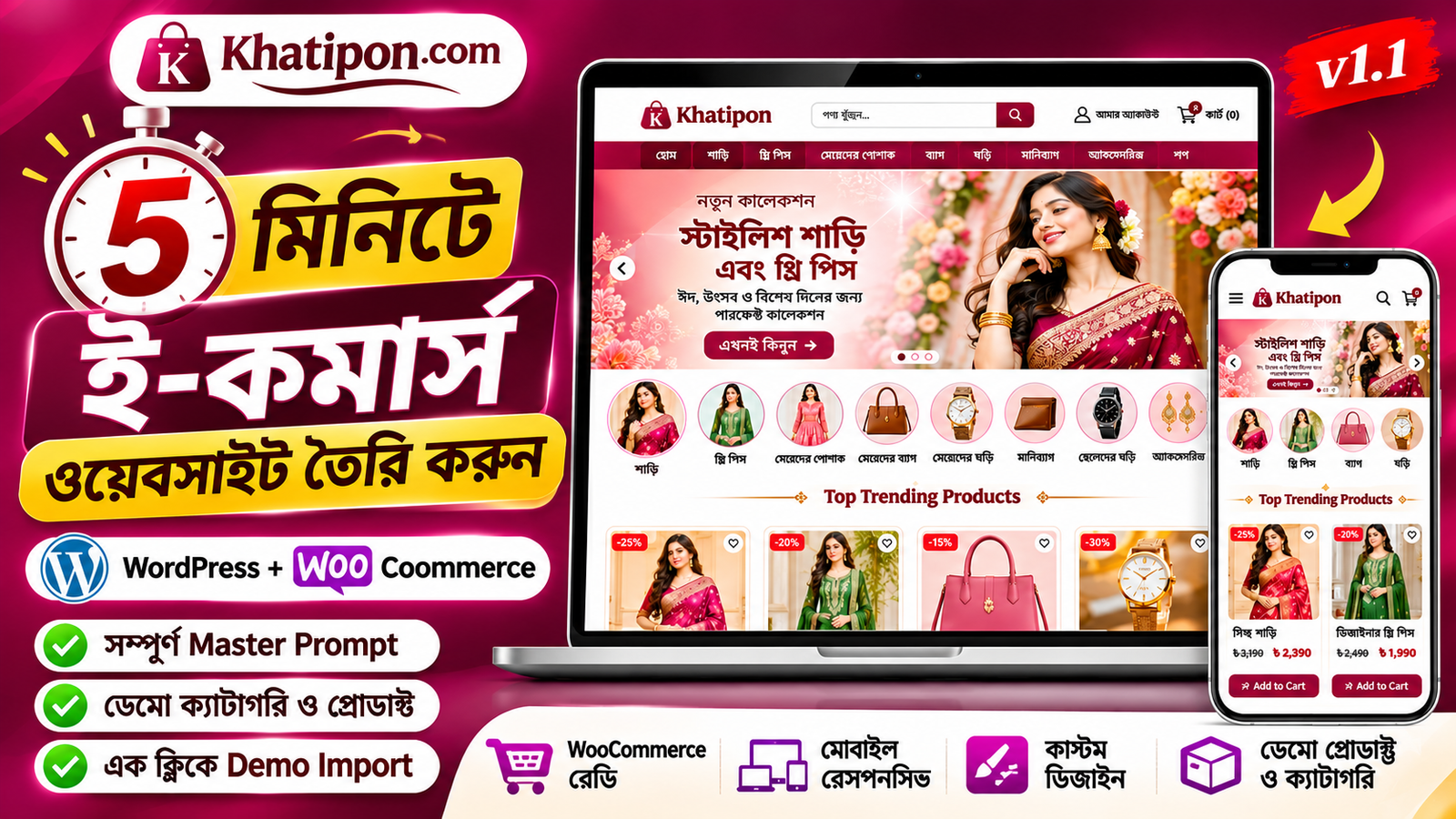
আজকে আমরা দেখাব কীভাবে Khatipon.com-এর মতো একটি আধুনিক, প্রিমিয়াম এবং সম্পূর্ণ WooCommerce ভিত্তিক ই-কমার্স ওয়েবসাইট তৈরি করবেন।
সবচেয়ে ভালো বিষয় হলো, এই আর্টিকেলের সঙ্গে একটি সম্পূর্ণ Master Prompt দেওয়া হয়েছে। আপনি শুধু প্রম্পটটি কপি করে AI-কে দিলেই আপনার নির্দেশনা অনুযায়ী WordPress Theme তৈরি করতে পারবেন।
এই ওয়েবসাইটে কী কী ফিচার থাকবে?
এই Master Prompt ব্যবহার করে তৈরি ওয়েবসাইটে নিচের ফিচারগুলো যুক্ত করা যাবে।
- প্রিমিয়াম লোগো ও আধুনিক হেডার।
- আকর্ষণীয় হোমপেজ ব্যানার।
- ব্যানারের নিচে ছবিসহ স্লাইডিং প্রোডাক্ট ক্যাটাগরি।
- Top Trending Products সেকশন।
- Best Selling Products সেকশন।
- প্রোডাক্ট কার্ডে Add to Cart বাটন।
- প্রোডাক্ট ডিটেইলস পেজ।
- Order Now এবং Add to Cart বাটন।
- কাস্টমারদের জন্য সহজ Checkout System।
- প্লাস ও মাইনাস বাটনের মাধ্যমে প্রোডাক্টের পরিমাণ পরিবর্তন।
- Facebook ও YouTube লিংকসহ Footer।
- Privacy Policy, Terms & Conditions এবং Return Policy পেজ।
কোন কোন প্রোডাক্ট বিক্রি করতে পারবেন?
এই ডিজাইনটি মূলত ফ্যাশন ও লাইফস্টাইল ই-কমার্স ওয়েবসাইটের জন্য তৈরি করা হয়েছে।
যেমন:
- মেয়েদের শাড়ি।
- থ্রি পিস ও বিভিন্ন স্টাইলিশ পোশাক।
- মেয়েদের ব্যাগ।
- মেয়েদের ঘড়ি।
- ছেলেদের মানিব্যাগ।
- ছেলেদের ঘড়ি।
- বিভিন্ন প্রয়োজনীয় ফ্যাশন ও লাইফস্টাইল পণ্য।
তবে আপনি চাইলে নিজের ব্যবসার ধরন অনুযায়ী ক্যাটাগরি ও প্রোডাক্ট পরিবর্তন করতে পারবেন।
ওয়েবসাইট তৈরি করতে যা যা প্রয়োজন
শুরু করার আগে আপনার প্রয়োজন হবে:
- একটি ডোমেইন নাম।
- একটি ওয়েব হোস্টিং।
- WordPress ইনস্টল করা একটি ওয়েবসাইট।
- WooCommerce Plugin।
- ChatGPT অথবা অন্য কোনো AI Coding Assistant।
আপনার ওয়েবসাইটে আগে থেকেই WordPress ইনস্টল করা থাকলে সরাসরি পরবর্তী ধাপে যেতে পারবেন।
ধাপে ধাপে যেভাবে ওয়েবসাইট তৈরি করবেন
ধাপ ১: AI Assistant ওপেন করুন
প্রথমে ChatGPT অথবা এমন কোনো AI Coding Assistant ওপেন করুন, যেটি সম্পূর্ণ WordPress Theme-এর কোড তৈরি করে ZIP ফাইল দিতে পারে।
ধাপ ২: Master Prompt কপি করুন
এই আর্টিকেলের নিচে দেওয়া সম্পূর্ণ Master Prompt কপি করুন।
এরপর AI Assistant-এর চ্যাট বক্সে পেস্ট করে পাঠিয়ে দিন।
ধাপ ৩: WordPress Theme তৈরি করুন
AI-কে নির্দেশ দিন যেন সে আপনার জন্য একটি সম্পূর্ণ Installable WordPress Theme তৈরি করে।
এখানে বিশেষভাবে উল্লেখ করবেন যে থিমটি যেন শুধু HTML Template না হয়। এটি অবশ্যই PHP, CSS, JavaScript এবং WooCommerce Integration-সহ একটি প্রকৃত WordPress Theme হতে হবে।
ধাপ ৪: ZIP ফাইল সংগ্রহ করুন
AI আপনার নির্দেশনা অনুযায়ী Theme-এর সব ফাইল তৈরি করে একটি ZIP ফাইল দিতে পারবে।
ZIP ফাইলটি ডাউনলোড করে রাখুন।
ধাপ ৫: WordPress-এ Theme Upload করুন
এখন আপনার WordPress Dashboard-এ প্রবেশ করুন।
এরপর:
Appearance → Themes → Add New Theme → Upload Theme
এখানে AI দিয়ে তৈরি ZIP ফাইলটি নির্বাচন করে Install Now চাপুন।
ইনস্টল সম্পন্ন হলে Activate করুন।
ধাপ ৬: WooCommerce সেটআপ করুন
WooCommerce Plugin ইনস্টল ও Activate করুন।
এরপর প্রয়োজন অনুযায়ী:
- Currency: Bangladeshi Taka (৳)
- Country: Bangladesh
- Store Address
- Shipping Zones
- Delivery Charges
- Cash on Delivery
কনফিগার করে নিন।
ধাপ ৭: Demo Import করুন
যদি আপনার তৈরি থিমে Demo Import সুবিধা থাকে, তাহলে WordPress Dashboard-এর নির্ধারিত Demo Import অপশন থেকে ডেমো কনটেন্ট ইমপোর্ট করুন।
এতে ডেমো ক্যাটাগরি, প্রোডাক্ট, ছবি ও নমুনা দাম স্বয়ংক্রিয়ভাবে যুক্ত হতে পারে।
সবশেষে নিজের আসল প্রোডাক্ট, ছবি ও দাম দিয়ে ডেমো প্রোডাক্টগুলো পরিবর্তন করে নিন।
সম্পূর্ণ Master Prompt
নিচের প্রম্পটটি কপি করে আপনার AI Assistant-কে দিন।
বিশেষ নির্দেশনা: নিজের ওয়েবসাইটের নাম, ডোমেইন এবং ব্যবসার ধরন অনুযায়ী প্রম্পটের Brand Information অংশ পরিবর্তন করতে পারবেন।
MASTER PROMPT: PREMIUM E-COMMERCE WORDPRESS THEME

Create a complete, premium, modern, fully functional and mobile-responsive WordPress WooCommerce theme.

BRAND INFORMATION:
Website Name: Khatipon
Domain: Khatipon.com
Theme Name: Khatipon
Theme Version: 1.1
Target Market: Bangladesh
Currency: Bangladeshi Taka (৳)
Language: Bengali and English.

BUSINESS TYPE:
Fashion, Clothing, Sarees, Three Piece Dresses, Women's Bags, Women's Watches, Men's Wallets, Men's Watches and Lifestyle Products.

1. PREMIUM BRAND DESIGN

Create an elegant fashion-focused brand identity.

Primary Color: Deep Burgundy (#702B3D)
Secondary Color: Cream (#FFF8F0)
Accent Color: Warm Gold (#C6A15B)
Background: White (#FFFFFF)
Text: Dark Charcoal (#292929)

2. WEBSITE HEADER

Create a professional header with:
- Khatipon Logo
- Search Bar
- My Account Icon
- Shopping Cart Icon
- Live Cart Counter
- Mobile Navigation
- Sticky Header

3. HOMEPAGE BANNER

Create a beautiful full-width promotional image slider.

Include:
- High-quality fashion images.
- Promotional headlines.
- Shop Now button.
- Multiple slides.
- Automatic sliding.
- Mobile responsive design.

Include at least two default banner images inside the theme.

4. SLIDING PRODUCT CATEGORY SECTION

IMPORTANT: The category section MUST appear immediately below the homepage banner and BEFORE Top Trending Products.

Create a continuously sliding horizontal category carousel.

Default Categories:
- Saree
- Three Piece
- Women's Fashion
- Women's Bags
- Women's Watches
- Men's Wallet
- Men's Watches
- Accessories

Each category must contain:
- Individual category image.
- Category name.
- Clickable category link.
- Touch swipe support.
- Smooth sliding animation.

Use individual image assets included inside the theme. Do not use the same placeholder image for every category.

5. TOP TRENDING PRODUCTS

Create a homepage section titled:
Top Trending Products

Display:
- Product Image
- Product Name
- Regular Price
- Sale Price
- Discount Percentage
- Add to Cart Button

Load products dynamically from WooCommerce.

6. BEST SELLING PRODUCTS

Create a separate section titled:
Best Selling Products

Automatically retrieve popular products based on WooCommerce sales statistics.

7. DEMO PRODUCT SYSTEM

Create a fully functional one-click Demo Import system.

Add a dashboard menu:
Appearance → Khatipon Demo Import

Add a button:
IMPORT DEMO CONTENT

Automatically create:
- 8 Product Categories.
- Individual Category Images.
- 12 Sample WooCommerce Products.
- Individual Product Images.
- Product Titles.
- Product Descriptions.
- Regular Prices.
- Sale Prices.
- Product Categories.
- Featured Images.

Use realistic sample prices in Bangladeshi Taka.

Demo products:
1. Premium Silk Saree
2. Designer Cotton Saree
3. Elegant Three Piece
4. Embroidered Three Piece
5. Women's Premium Handbag
6. Ladies Fashion Watch
7. Men's Leather Wallet
8. Men's Classic Watch
9. Women's Fashion Dress
10. Stylish Shoulder Bag
11. Premium Accessories
12. Everyday Fashion Item

IMPORTANT:
All demo images must be physically included inside the theme ZIP.

Do not depend on external image URLs during demo import.

Prevent duplicate imports and never delete real customer orders or existing products when removing demo content.

8. SINGLE PRODUCT DETAILS PAGE

Create:
- Product Image Gallery.
- Product Title.
- Product Price.
- Sale Price.
- Product Description.
- Product Variations.
- Stock Status.
- Quantity Selector.
- Plus Button.
- Minus Button.

Display buttons in this exact order:

1. ORDER NOW
2. ADD TO CART

ORDER NOW must add the selected product and quantity to the cart and redirect directly to checkout.

ADD TO CART must use WooCommerce cart functionality.

9. CUSTOM WOOCOMMERCE CHECKOUT

Create a clean, mobile-friendly checkout.

Display fields in this exact order:

1. Full Name
2. Mobile Number
3. Full Address
4. District
5. Order Notes

Use Bengali-friendly field labels.

Display:
- Ordered Products.
- Product Quantities.
- Product Prices.
- Subtotal.
- Delivery Charge.
- Grand Total.

Allow customers to increase or decrease quantities and remove products.

Display a prominent PLACE ORDER button.

Use genuine WooCommerce checkout and order processing.

Support Cash on Delivery.

All orders must be saved inside:
WordPress Dashboard → WooCommerce → Orders.

10. FOOTER SECTION

Create a premium footer with:
- Khatipon Logo.
- About Us.
- Contact Information.
- Facebook Page Link.
- YouTube Channel Link.
- Privacy Policy.
- Terms and Conditions.
- Return and Refund Policy.
- Shipping Policy.
- Copyright Information.

Make the information editable through WordPress Customizer.

11. ADDITIONAL PAGES

Support:
- Home
- Shop
- Product Category
- Single Product
- Cart
- Checkout
- My Account
- About Us
- Contact Us
- Privacy Policy
- Terms and Conditions
- Return and Refund Policy

12. WORDPRESS CUSTOMIZER

Provide options to customize:
- Logo.
- Header.
- Banner Images.
- Banner Text.
- Category Images.
- Category Names.
- Homepage Section Titles.
- Facebook URL.
- YouTube URL.
- Footer Details.
- Contact Information.
- Website Colors.

13. TECHNICAL REQUIREMENTS

- Genuine Installable WordPress Theme.
- WooCommerce Compatibility.
- PHP 8.0+ Compatibility.
- Responsive Design.
- SEO-Friendly Structure.
- Optimized Images.
- Fast Loading.
- Secure Coding.
- WordPress Coding Standards.
- Proper Sanitization and Escaping.
- Nonce Validation.
- Translation Ready.
- Functional Buttons and Links.

14. FINAL DELIVERABLE

Create the complete WordPress theme folder:

khatipon-theme/

Include:
- PHP Templates.
- CSS Files.
- JavaScript Files.
- Logo Assets.
- Banner Images.
- Category Images.
- Demo Product Images.
- Demo Importer.
- WooCommerce Templates.
- Theme Documentation.

Generate the final installable ZIP:

khatipon-wordpress-theme-v1.1.zip

IMPORTANT:
Do not deliver a static HTML mockup or incomplete theme.

Deliver a genuine installable WordPress WooCommerce theme.

Before delivery, validate the ZIP structure, PHP syntax, theme activation compatibility, demo importer and WooCommerce integration.
গুরুত্বপূর্ণ কিছু বিষয়
মনে রাখবেন, শুধু Master Prompt দিলেই ওয়েবসাইট স্বয়ংক্রিয়ভাবে লাইভ হয়ে যাবে না। AI দিয়ে থিম তৈরি, WordPress-এ ইনস্টল, WooCommerce কনফিগারেশন এবং ডোমেইন হোস্টিং সেটআপ সম্পন্ন করতে হবে।
এছাড়া AI দিয়ে তৈরি ZIP ফাইল ইনস্টল করার আগে অবশ্যই কোড, নিরাপত্তা, চেকআউট এবং অর্ডার সিস্টেম পরীক্ষা করে নেবেন।
শেষ কথা
আপনার যদি নিজের একটি অনলাইন শপ তৈরি করার ইচ্ছা থাকে, তাহলে এই Master Prompt ব্যবহার করে শুরু করতে পারেন। সবচেয়ে ভালো বিষয় হলো, আপনি চাইলে নিজের পছন্দ অনুযায়ী ডিজাইন, ক্যাটাগরি, প্রোডাক্ট এবং ওয়েবসাইটের ফিচার পরিবর্তন করতে পারবেন।
আর্টিকেলটি ভালো লাগলে বন্ধুদের সঙ্গে শেয়ার করুন, যাতে তারাও AI ব্যবহার করে নিজের ই-কমার্স ওয়েবসাইট তৈরির কাজ শুরু করতে পারেন।
Happy Website Building!